
 listicle
Best Restoration Scheduling Tools 2026: Top Picks
Table of Contents
- Quick Comparison: Best Restoration Scheduling Tools 2026
- How We Evaluated These Restoration Scheduling Tools
- 1. Cortex by JobDox: AI-Native Scheduling and Documentation
- 2. QuoteIQ: Affordable Scheduling for Water Damage Mitigation
- 3. Workiz: Built-In Phone System for Emergency Response
- 4. Smartsheet: Customizable Project Management for Complex Jobs
- 5. FieldPulse: All-in-One CRM and Job Costing
- 6. WorkWave: Advanced Routing for Large Restoration Companies
- How AI Tools for Contractors Improve Dispatching and Drying Logs
- What Restoration Management Software Features Actually Matter
- Frequently Asked Questions
Last Updated: September 22, 2026
Quick Comparison: Best Restoration Scheduling Tools 2026
Choosing the best restoration scheduling tools 2026 matters for contractors juggling emergency calls, drying logs, and adjuster deadlines. This guide from Cortex by JobDox covers six platforms built for restoration work.
Quick Picks:
- Best Overall: Cortex by JobDox, AI-native scheduling, documentation, and adjuster workflows in one platform
- Best Budget Option: QuoteIQ
- Best for Custom Projects: Smartsheet, flexible Gantt-based project management
| Tool | Starting Price | Free Trial | Best For | Standout Feature |
|---|---|---|---|---|
| Cortex by JobDox | Free trial available | Yes | AI-driven restoration operations | Copilot answers job and crew questions |
| QuoteIQ | $29.99/month | No | Water damage mitigation | Drag-and-drop multi-user calendar |
| Workiz | Contact for pricing | No | Emergency response | Built-in phone system |
| Smartsheet | $9/user/month | No | Complex custom jobs | Gantt chart project views |
| FieldPulse | Contact for pricing | No | CRM and job costing | Unified dispatch and CRM |
| WorkWave | Contact for pricing | No | Large fleets | Advanced route optimization |
How We Evaluated These Restoration Scheduling Tools
We scored each platform on dispatching speed, documentation depth, mobile usability, accounting and CRM integration, and total cost as your crew grows.
1. Cortex by JobDox: AI-Native Scheduling and Documentation
Cortex by JobDox is our top pick because it was built for restoration contractors rather than adapted from general field service software, handling scheduling, documentation, and adjuster communication in one AI-native platform.
Key Features
- Automated setup builds workflows from plain English descriptions
- Cortex Copilot answers job, crew, and financial questions in plain language
- Predicts project budgets and flags overruns early
- Drafts adjuster responses to help recover more money
- Converts won jobs into search-optimized local landing pages
Pricing
Cortex by JobDox offers a free trial, and current plan pricing is listed on the Cortex by JobDox pricing page.
Pros and Cons
Pros: Purpose-built for restoration, automated documentation, optional white-glove onboarding. Cons: Teams that prefer building workflows by hand may want the guided setup instead.
2. QuoteIQ: Affordable Scheduling for Water Damage Mitigation
QuoteIQ targets water damage mitigation companies needing a simple, affordable calendar.
Key Features
- Drag-and-drop multi-user calendar
- Real-time job scheduling
- Client communication tools
- Mobile-responsive interface
Pricing
QuoteIQ starts at $29.99/month on a subscription model.
Pros and Cons
Pros: Intuitive interface. Cons: Limited feature set compared to enterprise platforms, so growing teams often outgrow it.
3. Workiz: Built-In Phone System for Emergency Response
Workiz stands out because the phone system is baked in, a genuine differentiator for restoration companies fielding emergency calls at all hours.
Key Features
- Centralized dispatch board
- Integrated phone system
- Real-time technician GPS tracking
- Automated SMS updates
Pricing
Workiz uses subscription pricing; contact the vendor for current rates.
Pros and Cons
Pros: Strong dispatching and communication tools. Cons: Costs climb as you add users.
4. Smartsheet: Customizable Project Management for Complex Jobs
Smartsheet is not restoration-specific, both its strength and weakness: teams running large-loss projects can build almost any workflow.
Key Features
- Gantt chart project views
- Automated workflow triggers
- Resource management dashboards
- Extensive API integrations
Pricing
Smartsheet starts at $9/user/month.
Pros and Cons
Pros: Highly customizable, powerful automation. Cons: Requires significant setup time and no built-in moisture documentation.
5. FieldPulse: All-in-One CRM and Job Costing
FieldPulse bundles CRM, scheduling, and job costing, giving contractors customer history and profitability in one view.
Key Features
- Dynamic dispatch board
- Customer relationship management
- Job costing and estimation
- Mobile team management
Pricing
FieldPulse uses subscription pricing; contact the vendor for current rates.
Pros and Cons
Pros: Unified CRM and scheduling, solid job profitability tracking. Cons: Interface can feel cluttered for new users.
6. WorkWave: Advanced Routing for Large Restoration Companies
WorkWave fits larger operations where routing efficiency decides whether crews hit every job on time; its route optimization is the strongest here.
Key Features
- Advanced route optimization
- Automated scheduling and dispatch
- Mobile workforce management
- Detailed performance reporting
Pricing
WorkWave uses subscription pricing; contact the vendor for current rates.
Pros and Cons
Pros: Superior routing, strong reporting. Cons: Higher cost of entry than smaller tools.
How AI Tools for Contractors Improve Dispatching and Drying Logs
AI tools for contractors now handle two jobs that ate hours of admin time: routing the right crew to the right job, and turning raw moisture readings into adjuster-ready drying logs. Real restoration AI has job context, equipment on site, psychrometric readings, carrier requirements, not just a calendar.
What AI dispatching actually does
A useful dispatch engine scores every open job against every available crew on four inputs:
- Skill match: water mitigation, mold remediation, biohazard, or reconstruction certification
- Proximity and drive time: not just miles, but realistic traffic and load-in time
- Equipment availability: whether the assigned truck already carries the right number of air movers, dehumidifiers, and injectidry units for the loss class
- Carrier and adjuster constraints: some carriers require a specific technician certification or a same-day acknowledgment
How drying logs get generated
Manual drying logs are the biggest source of back-office rework. The AI-assisted version works like this:
- A technician captures a moisture reading on a tablet, pin meter, non-invasive meter, or thermo-hygrometer, and the reading is timestamped and geotagged.
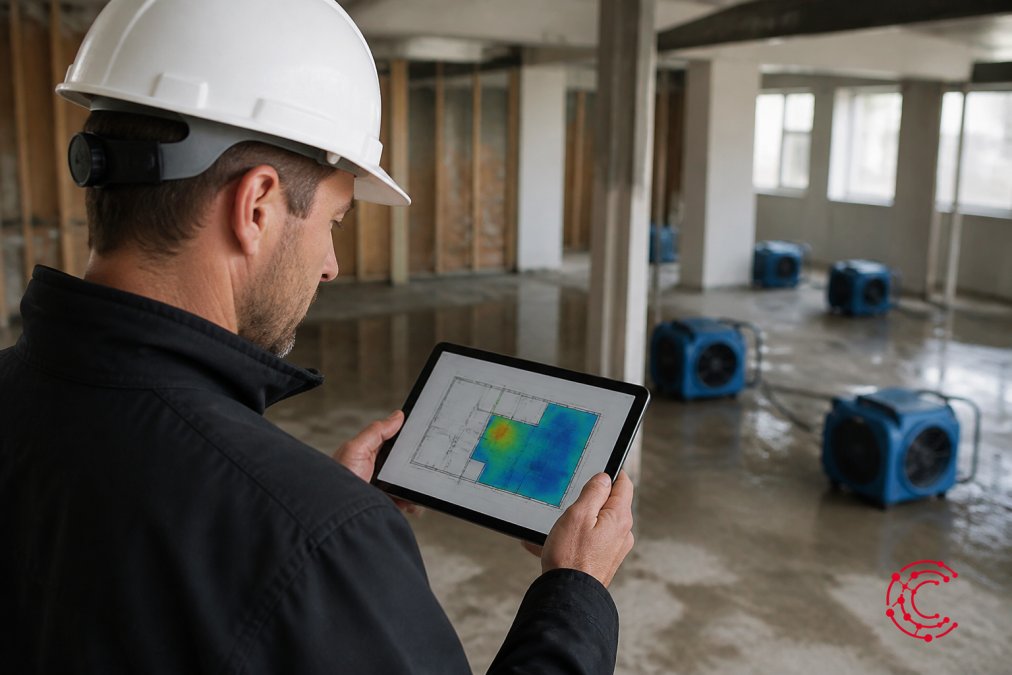
- The platform plots the reading onto the moisture map for that room and floor.
- The system compares the reading against the drying goal for the material (dry standard for drywall, hardwood, concrete, etc.) and flags whether the trend is on track.
- When the job closes, the platform assembles the readings, photos, equipment logs, and psychrometric data into a single exportable drying report.
Where the payoff shows up
The practical gains cluster in three places:
- Dispatching: fewer windshield hours per job and fewer callbacks when the wrong crew shows up
- Documentation: drying logs and moisture maps generate as technicians work, not the night before the adjuster visit
- Billing: estimate generation, compliance reporting, and invoicing pull from the same record, so job costing stops being a month-end guess
That last point matters most. When documentation, scheduling, and invoicing share one record, the office stops rebuilding the same job three times.
What Restoration Management Software Features Actually Matter
Restoration management software features fall into four groups: scheduling and dispatching, documentation and compliance, financial tracking, and customer communication. Buy for the first two and the rest follows. But the features separating a restoration-specific platform from a generic field service app are the ones most comparison articles skip, insurance carrier interoperability and the migration path off your current system.
The four feature groups, ranked by job impact
- Scheduling and dispatching: real-time updates, technician routing, resource allocation, on-call rotation
- Documentation and compliance: drying logs, moisture mapping, psychrometric readings, equipment logs, compliance reporting
- Financial tracking: job costing, estimate generation, time tracking, inventory management, progress billing
- Customer communication: customer portal, automated workflows, lead tracking, review requests
| Priority | Feature | Why It Matters |
|---|---|---|
| High | Drying logs and moisture mapping | Drives adjuster approval speed and protects the drying line item |
| High | Real-time dispatching | Cuts emergency response time on the first 24 hours of a loss |
| High | Carrier portal interoperability | Prevents office staff from retyping documentation into each carrier's system |
| Medium | Job costing | Protects margin on every job, especially on CAT work |
| Medium | API integration | Connects accounting and CRM without double entry |
| Lower | Inventory management | Useful once fleet and equipment count grow |
Gap 1: Interoperability with insurance carrier portals
Most buyers only discover this feature after the first denied supplement. Restoration work is paid by carriers, each running its own intake and documentation workflow. A platform that only exports a PDF forces your admin team to re-key the same drying log, moisture map, and equipment list into a different portal for every carrier.
What to look for:
- Structured exports, not just PDFs. Ask whether the platform can output documentation in a format the carrier's system accepts directly, or whether it only produces a printable report.
- Carrier-specific templates. Some platforms maintain templates for the major carriers' documentation expectations, so the drying log arrives in the shape the adjuster expects.
- Photo and timestamp integrity. Carriers increasingly want geotagged, timestamped photos tied to specific readings. If your tool strips that metadata on export, the documentation loses weight.
- Adjuster communication trail. Emails, supplements, and approvals should live on the job record, not in a personal inbox, so anyone on the team can pick up the file.
Gap 2: Implementation timeline and data migration
The second feature buyers underweight decides whether the switch happens: how long onboarding takes and what happens to your existing job history.
Questions to ask every vendor before signing:
- How long is typical onboarding? A small shop may be live in days; a multi-branch operation with custom workflows can take weeks. Get the timeline in writing.
- Who does the data migration? Some vendors migrate your customer list, open jobs, and equipment inventory for you. Others hand you a CSV template and wish you luck.
- What happens to historical drying logs? If old job documentation does not come across, you lose the reference data your estimators use to price new losses.
- Is training included? White-glove onboarding, live training, and a dedicated implementation contact are worth real money on a multi-crew rollout.
- What is the rollback plan? Ask what happens if the rollout stalls mid-quarter. A vendor with no answer is a vendor you will be stuck with.
Frequently Asked Questions
What features should I look for in restoration management software?
Prioritize automated drying logs and moisture mapping, since these are the documentation items adjusters scrutinize most. You also need dispatching with technician routing, job costing that updates in real time, and a customer portal for adjuster communication. Mobile-first design matters because crews work on site, not at a desk. Finally, check whether the platform supports compliance reporting and data synchronization with your accounting system. Cortex by JobDox bundles these into one platform, and its AI drafts adjuster responses to help recover more money on each claim.
How does AI improve scheduling in restoration project management?
AI tools for contractors analyze job history, crew availability, and travel time to build schedules that account for emergency response windows. Instead of a dispatcher manually reshuffling a board when a new water damage mitigation call comes in, the system routes the nearest qualified technician automatically. AI also predicts project budgets and flags overruns early, so you can adjust resource allocation before a job eats your margin. Cortex by JobDox applies this to restoration specifically, learning what a cost overrun looks like for drying and mitigation work rather than generic field service jobs.
What programs do restoration companies use to manage field crews?
Most restoration companies choose between industry-specific tools and general field service management platforms. QuoteIQ handles water damage scheduling. Workiz adds a built-in phone system for emergency response calls. Smartsheet offers customizable project management for complex jobs. WorkWave provides advanced route optimization for larger operations. Cortex by JobDox combines scheduling, documentation, and AI-driven budget prediction in one platform built for restoration contractors, with automated setup that builds workflows from plain English descriptions.
How long does it take to implement restoration scheduling software?
Implementation timelines vary by platform. Smartsheet requires significant setup time because you build your own workflows. Enterprise suites often take weeks of onboarding. Cortex by JobDox takes a different approach with automated setup that builds workflows based on plain English descriptions of how your company operates, and white-glove onboarding is available if you want hands-on help. Before committing, ask any vendor about data migration from your current system and how much of your team's time will be pulled away from jobs.
Do restoration scheduling tools work offline at remote disaster sites?
Offline functionality matters when you are working in areas with damaged infrastructure or poor cell coverage, which is common after storms and floods. Not every platform handles this well, so test it before you buy. Ask vendors whether technicians can capture photos, moisture readings, and drying logs offline and whether the data synchronization happens automatically once connectivity returns. Losing documentation because of a dead zone can cost you the claim, so this is a question worth asking during your demo.
Restoration teams lose margin in the gap between the field and the office: readings on paper, adjuster emails in one inbox, invoices in another. Cortex by JobDox closes that gap with automated documentation, budget predictions that flag overruns early, and Copilot answers in plain English. Start a 14-day free trial and see how much admin time your crew gets back.