 how-to
Can AI Really Improve Construction Job Site Safety?
Last Updated: October 31, 2026
Quick Summary
Improving construction job site safety with AI means using cameras, sensors, wearables, and drones to detect hazards, flag PPE violations, and predict risk before an accident happens. Start with one site, one hazard, and one metric, then scale only after the pilot proves results.
- A review of 153 studies found AI-enabled drones and robots can inspect sites while cutting human exposure to risk.
- AI construction safety tools fall into four groups: cameras, wearables, drones, and sensors.
- Baseline your chosen metric manually for two to four weeks before installing any hardware.
- Run the pilot for 30 to 60 days, since longer pilots lose momentum and crew buy-in.
- Keep safety monitoring separate from discipline so the crew does not see cameras as surveillance.
Table of Contents
- Why Construction Job Site Safety Needs a Different Approach
- AI Hazard Detection in Construction: How It Works on a Live Site
- AI-Powered PPE Detection and Worker-Machine Proximity Alerts
- Construction Safety Risk Prediction Before the Accident Happens
- AI Construction Safety Tools: Cameras, Wearables, Drones, and Sensors
- Step-by-Step: Rolling Out AI Safety Tools Without Disrupting the Crew
- Phase 1: Assess site readiness before you buy anything
- Phase 2: Scope the pilot around one hazard and one metric
- Phase 3: Integrate with existing workflows, not alongside them
- Phase 4: Train the crew in one session, then reinforce on the floor
- Phase 5: Measure outcomes against the baseline
- Phase 6: Scale only after proof
- Privacy, False Alarms, and Human Oversight: What to Get Right
- Start With One Job Site and One Measurable Safety Goal
- Frequently Asked Questions
Why Construction Job Site Safety Needs a Different Approach
Construction remains one of the most dangerous industries in the country, and the numbers tell a story that traditional safety meetings cannot fix.
Paper checklists and weekly walkthroughs catch what already happened; they do not catch the worker standing too close to a swinging excavator arm right now.
Below, we break down how the technology works on a live site and how to roll it out without slowing your crew.
AI Hazard Detection in Construction: How It Works on a Live Site
AI hazard detection in construction is the use of cameras, sensors, and machine learning models to spot unsafe conditions and flag them automatically, sending an alert before a near miss becomes an injury.
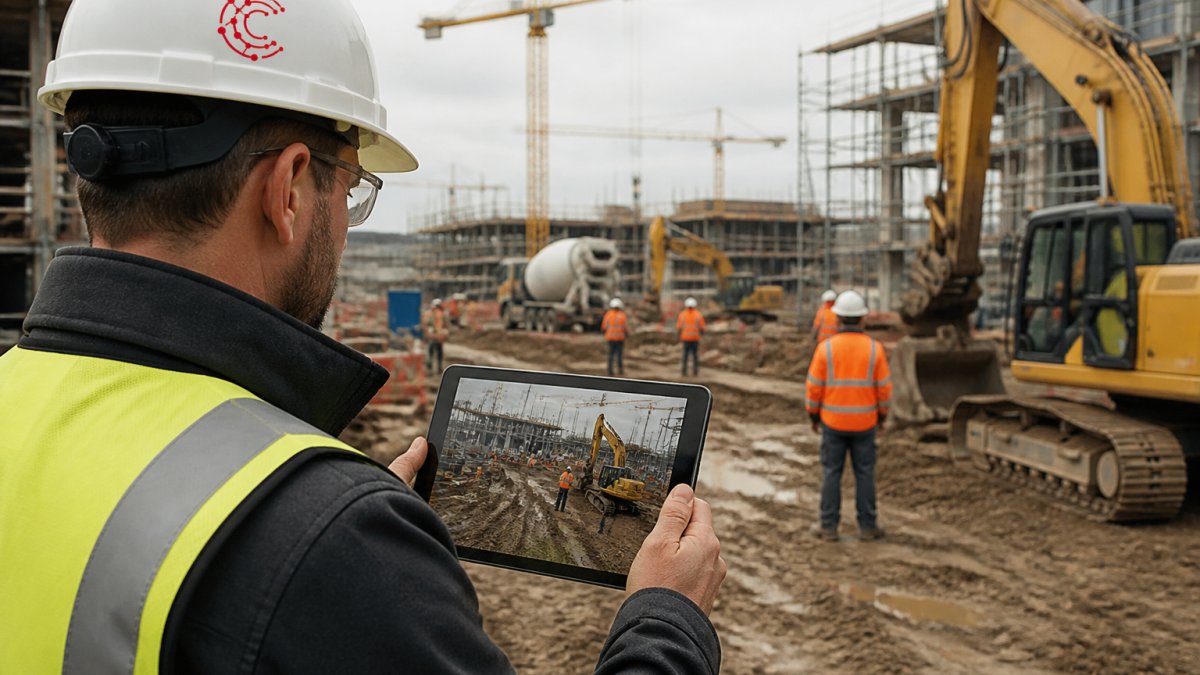
A 2025 review in Buildings journal on AI in construction safety describes how these systems pull data from cameras, wearables, and sensors to detect hazards and predict risk. In practice, that means:
- Computer vision scans video for unsafe behavior and blocked exits
- Sensors track equipment movement and worker location
- Live data feeds a dashboard that ranks active risks
AI-Powered PPE Detection and Worker-Machine Proximity Alerts
AI-powered PPE detection is the automated use of cameras to confirm workers wear hard hats, vests, and eye protection.
A Global Infrastructure Hub case study on AI and sensors for safe construction describes systems that detect whether workers wear required safety gear and alert them when equipment is missing.
Watch out: cameras that only catch violations without any feedback loop will burn trust fast.
Construction Safety Risk Prediction Before the Accident Happens
Construction safety risk prediction uses past incident data, near misses, and site-specific conditions to forecast where the next accident is likely. Instead of reacting to injuries, teams get a ranked list of risks to address this week.
The technology leans on predictive analytics. It studies patterns like time of day, weather, crew size, and task type, then scores each job for risk.
AI Construction Safety Tools: Cameras, Wearables, Drones, and Sensors
AI construction safety tools fall into four main groups, and most sites end up mixing two or three.
| Tool Type | What It Does | Best For |
|---|---|---|
| AI-powered cameras | Detect PPE violations, blocked exits, unsafe behavior | Fixed sites with steady traffic |
| Wearables | Track location, vitals, and fall detection | Crews near heavy machinery |
| Drones | Inspect roofs, scaffolding, and tight spaces | High-risk inspections |
| Sensors | Monitor equipment, noise, and air quality | Hazardous tasks and confined areas |
To compare platforms before you commit, our guide to the best AI tools for contractors covers project management, cost estimation, and automation side by side.
Step-by-Step: Rolling Out AI Safety Tools Without Disrupting the Crew
A practical implementation roadmap keeps the rollout small, measurable, and reversible. A common arc is to assess readiness, scope a pilot, integrate with existing workflows, train the crew, measure outcomes, then scale.
Phase 1: Assess site readiness before you buy anything
Readiness is not about budget. It is about whether the site can support reliable detection and whether the crew will accept it. Score each site on four dimensions:
- Connectivity and power. Cameras and edge devices need stable bandwidth and power at the mount point. Spotty Wi-Fi or no power drops near the work face means cellular backhaul or battery/solar mounts.
- Layout stability. A site that reshuffles every week will break fixed-camera detection zones; high-churn sites are better candidates for wearable or mobile systems first.
- Existing safety process. A site with a real near-miss reporting habit and a named safety lead can absorb alerts. A site with no owner for safety will let alerts pile up.
A common pattern is to pilot on a site that scores well on connectivity and layout stability but has a known, measurable hazard problem, PPE compliance or worker-machine proximity, so the pilot has something to prove.
Phase 2: Scope the pilot around one hazard and one metric
Pick a single hazard category and a single primary metric. Examples: hard-hat compliance rate on the active work face, or the count of proximity events inside an excavator swing radius per shift. Define the metric before installation so the baseline is honest.
- Baseline for two to four weeks. Record the metric manually, walkthrough counts, spot checks, or existing camera review, so you have a pre-installation number.
- Install the minimum hardware. Two to three cameras covering the highest-risk zone beats a full-site network. Add edge processing on-site where bandwidth is limited.
- Set alert routing on day one. Decide who receives alerts, on what device, and within what response window. An alert with no owner is noise.
Phase 3: Integrate with existing workflows, not alongside them
The most common failure mode is a safety tool that lives in its own dashboard. Integration means the alert lands where the crew already works:
- Route alerts into the same channel the crew uses for daily coordination (text, radio, or the project management app).
- Tie each alert to an existing corrective-action or near-miss record so closure is tracked in one system.
- Keep camera placement and detection zones documented and versioned, because stale zones produce false alarms.
Data quality is the quiet constraint. Detection accuracy depends on camera angle, lighting, dust, and occlusion, so walk the site at different times of day before finalizing mounts.
Phase 4: Train the crew in one session, then reinforce on the floor
One session is enough if it covers three things: what the system flags, what happens after a flag, and what is not recorded. For a deeper walkthrough, see how to train field staff on new digital tools. Follow up in the first week by reviewing a handful of real alerts with the crew so they see the feedback loop working.
Phase 5: Measure outcomes against the baseline
Run the pilot for 30 to 60 days. Longer pilots lose momentum and crew buy-in. Track a small set of outcome measures:
- Primary metric, the hazard rate you baselined (for example, PPE compliance rate).
- Hazard closure time, median time from alert to corrective action.
- Alert accuracy, share of alerts a supervisor confirms as real; track false positives separately as the leading indicator of crew fatigue.
Phase 6: Scale only after proof
Expand to the next site when the pilot shows improvement on the primary metric and alert accuracy is stable. Scaling means repeating the readiness assessment, not cloning the first install, connectivity, layout, and crew composition differ site to site. Keep a central owner for thresholds and alert policy so settings do not drift.
Privacy, False Alarms, and Human Oversight: What to Get Right
Privacy and human oversight are central to whether an AI safety program succeeds. Workers accept cameras that protect them and resist cameras that feel like surveillance with no explanation. The difference is rarely the technology, it is the policy, transparency, and human review layer around it.
Build the privacy policy before the cameras go up
Treat camera and wearable data as a governed asset from day one. A workable policy covers five things:
- What is collected. Specify video, audio (usually off), location, and biometric or vital-sign data separately. Audio capture and facial recognition are the two features most likely to trigger worker objections and legal obligations, decide explicitly whether you need them.
- Where it is processed. Edge processing on-site keeps raw video local and sends only event metadata to the cloud, reducing bandwidth cost and privacy exposure.
- Retention. Set a short default retention for raw video (days, not months) and a longer retention only for confirmed incidents. Delete on schedule and document it.
State law matters here. You can also review the sub-processors that Cortex by JobDox uses to operate the platform and the categories of data they process. Several states have enacted biometric privacy statutes and employee-monitoring notice requirements, and the rules differ on consent, notice, and retention. Confirm your obligations with counsel before deployment.
Keep safety monitoring separate from discipline
The fastest way to lose the crew is to let camera footage become the primary evidence in disciplinary actions. A pattern that works: alerts drive coaching and corrective action in the moment, and footage is reviewed for discipline only when an incident or a repeated, documented pattern warrants it, under a written rule the crew has seen. The system flags; a qualified safety professional decides.
Validate alerts and tame false positives
False alarms are the silent killer of these programs. A camera that cries wolf ten times a day gets ignored by week two. Build a validation workflow:
- Tier the alerts. Low-confidence detections route to a review queue; high-confidence, high-severity detections (a worker inside an excavator swing radius) route straight to a supervisor.
- Confirm or dismiss every alert. Each confirmation or dismissal is training data and a quality signal.
- Review logs weekly. Look at false-positive rate by camera, zone, and time of day. A camera that underperforms at dusk needs a lighting fix or a new mount, not a sensitivity tweak that creates misses.
- Tune thresholds deliberately. Lowering sensitivity to cut false alarms also cuts true detections; track both rates together.
- Assign ownership. Name the person responsible for alert policy and threshold changes.
Keep qualified safety professionals in the decision loop
AI detection is an input, not a verdict. The safety lead owns the response protocol: who responds, within what window, and what corrective action is recorded. Review alert accuracy and response times in the same meeting where you review incidents.
Start With One Job Site and One Measurable Safety Goal
A practical approach is to pick one job site, one measurable safety goal, and one clear owner, then prove it works before expanding.
Cortex by JobDox automates documentation and operational workflows and offers Cortex Copilot, which answers job, crew, and financial questions in plain English. Predictive budgeting flags overruns early. Start your 14-day free trial to see how it fits your operations.
Frequently Asked Questions
How can AI improve construction site safety?
AI improves construction job site safety by watching for hazards continuously rather than in periodic walkthroughs. AI-powered cameras can be configured to flag hazards such as missing personal protective equipment, then send alerts. The result is faster incident response and fewer near misses that go unreported.
Can AI cameras detect hazards on a construction site?
Yes, within limits. AI-powered cameras can be configured to detect some visible conditions, such as missing personal protective equipment. Cameras work best as a first filter: a human safety manager still reviews flagged events and decides what action to take.
How should contractors introduce AI into existing safety workflows?
Start with one site and one problem, such as PPE compliance or worker-machine proximity. Confirm your camera and sensor coverage, set a baseline for near misses and violations, then run the tool for 30 days before judging it. Keep your existing safety protocols and toolbox talks in place, and assign one person to review alerts daily. Contractors who skip the baseline cannot show whether the tool reduced incidents or simply generated more paperwork.
What are the limitations of AI in construction safety?
AI sees what its sensors cover, so blind spots, poor lighting, and dusty lenses produce missed detections or false alarms. It also cannot judge intent or context, which is why human oversight stays mandatory. AI safety systems generally combine cameras, wearables, and sensors, and their accuracy depends on data quality. Budget for review time and expect a tuning period before alerts become reliable.
The challenge is not whether AI can improve construction job site safety. It is whether your team can adopt it without disruption. Start your 14-day free trial with Cortex by JobDox and put one measurable safety goal to work on your next job.