 how-to
How to Automate Restoration Project Documentation
Table of Contents
- Why Manual Restoration Project Documentation Costs You Money
- Core Features of Restoration Project Management Software
- Step 1: Digitize Data Capture with Mobile Forms
- Step 2: Centralize Documents in a Cloud-Based Repository
- Step 3: Automate Report Generation and Adjuster Communication
- Step 4: Protect Data and Keep a Clean Audit Trail
- Choosing Among the Best AI Tools for Contractors
- Build Your Automation Roadmap
- Frequently Asked Questions
Last Updated: September 5, 2026
Restoration project documentation is the backbone of every claim you file, and for most small firms it is also the biggest hidden drain on profit. When your project managers are chasing paper, re-typing data, and emailing photos back and forth, the overhead eats into the margin on every job. This guide from Cortex by JobDox breaks down a four-step system for automating restoration project documentation so your field teams capture clean data once, and your office never touches a keyboard to re-enter it.
The core problem is that manual documentation is slow, error-prone, and invisible until the adjuster asks for a report you cannot produce quickly. The fix is not buying more software; it is changing how your documentation workflow is structured.
Why Manual Restoration Project Documentation Costs You Money
Every hour a project manager spends on paperwork is an hour they are not overseeing the crew or communicating with the homeowner. Manual documentation also creates a lag between what happens on site and what the office knows, which leads to missed change orders and unbilled work.
The real cost shows up at the end of the job. When you have to reconstruct three weeks of drying logs, daily photos, and material deliveries from memory, you lose line items. Many firms find that a disorganized claim file results in disputed invoices and slower payments from insurance carriers. The fix is to treat documentation as a real-time process, not a post-job cleanup task.
Automated reporting changes this. When data is captured digitally at the source, the daily report, the photo log, and the invoice backup all assemble themselves. According to guidance on digital recordkeeping for small businesses, maintaining organized digital records is a best practice that supports faster audits and smoother financial reviews.
Core Features of Restoration Project Management Software
Restoration project management software features are not all created equal. To eliminate manual entry, you need a platform that covers five specific functions rather than a generic job scheduling tool.
- Mobile data entry: Field techs log notes, photos, and readings from a phone or tablet.
- Cloud-based documentation: Files sync in real time so the office sees the same data as the crew.
- Automated report generation: Daily logs and adjuster summaries compile without manual assembly.
- Centralized repository: All versions of a document live in one searchable location.
- Audit trail: Every edit is timestamped and attributed to a user.
The key distinction is whether the software is built for restoration workflows specifically. Generic tools handle scheduling well, but they often fail at the documentation format adjusters expect. A platform that thinks like a restoration project manager will flag missing signatures or incomplete drying logs before you send the file. This is where the National Association of Insurance Commissioners' guide on claim handling becomes relevant, since it outlines the documentation standards carriers expect during the claim process.
Step 1: Digitize Data Capture with Mobile Forms
The first step in automating restoration project documentation is to stop using paper forms and start capturing data on mobile devices at the point of work. This means equipping your crew with standardized digital forms that force consistent data entry, rather than free-form notes that vary by person.
Build forms for each stage of the project lifecycle: initial inspection, daily progress, equipment placement, and final sign-off. Include mandatory fields for moisture readings, temperature, and photo attachments. The goal is that a technician can complete the entire incident documentation on site in under five minutes, with no need to re-enter it later.
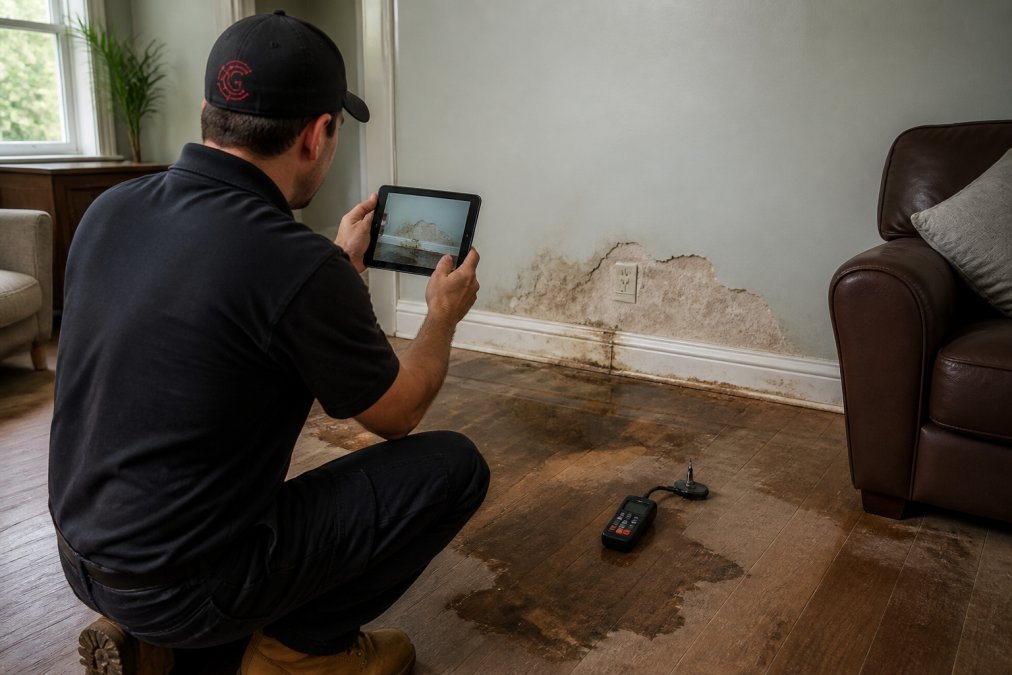
Mobile data entry also eliminates transcription errors. When a number is typed once into a form, it flows into every downstream report. When it is written on paper and re-typed later, the risk of a transposed digit or a skipped line goes up significantly.
Step 2: Centralize Documents in a Cloud-Based Repository
Once data is captured digitally, it needs a single home. A cloud-based repository acts as the central nervous system for your documentation, replacing the scattered inbox of emails and local drives where files currently get lost.
Set up folder structures that mirror your job numbering system. Every project gets a folder with subfolders for contracts, daily logs, photos, and change orders. This makes document retrieval a matter of seconds, not a phone call to the office asking where a file was saved.
Real-time synchronization is critical here. When the field team uploads a photo, the office and the project manager should see it immediately. This field-to-office communication loop means that if an adjuster calls asking for status, your admin has the answer without leaving their desk.
Version control is another benefit of centralization. When you store documents in a shared system, you eliminate the confusion of multiple file versions floating around via email. The repository holds the single source of truth, and every edit creates a new version with a clean audit trail.
Step 3: Automate Report Generation and Adjuster Communication
The biggest time savings come when you automate the reports you send to adjusters and carriers. Instead of assembling a PDF from multiple sources, the software pulls the data from your digital forms and generates the report automatically.
Daily progress reports are the most common need. These should compile the drying log, the photos taken that day, and the equipment on site into a single document that requires zero manual assembly. Automated reporting ensures that the adjuster gets a consistent, professional document every single day, which builds trust and speeds up approval.
For insurance claim processing, the format matters as much as the content. Adjusters are used to a specific structure for mitigation documentation and loss documentation. If your report deviates from that structure, it triggers questions and delays. Look for software that drafts adjuster responses in the language carriers expect, flagging any gaps in the documentation before you hit send.
Step 4: Protect Data and Keep a Clean Audit Trail
Automation does not remove your responsibility for data security and compliance. In fact, it concentrates your risk into one system, which means that system needs strong protections. Your documentation platform should enforce role-based access, so only authorized staff can view or edit sensitive claim files.
A clean audit trail is your best defense in a dispute. Every photo upload, every edit to a drying log, and every sign-off must be timestamped and attributed to a specific user. This creates a verifiable record that satisfies compliance standards and protects you if a claim is challenged months later.
Data integrity also means planning for post-restoration archival. When a job closes, the file needs to be retained for the period your state requires for construction records. A cloud-based system makes this simple; you archive the project folder and it remains searchable without taking up physical space.
The Long-Tail: Post-Restoration Archival and Retrieval
The documentation lifecycle does not end when the check clears. In restoration, the liability window extends years beyond the final invoice. A homeowner can file a claim for secondary damage, mold growth, structural issues, or incomplete drying, 12, 24, or even 36 months after your crew leaves the site. When that happens, your defense rests entirely on your ability to produce the original drying logs, daily photos, and equipment placement records from that specific job.
The problem is that most firms treat archival as a black hole. Files go to a hard drive or a box in storage, and retrieving them requires a scavenger hunt. By the time you find the records, the homeowner's attorney has already filed a motion. The fix is to design your archival system for retrieval, not just storage.
Retention Schedules and Legal Requirements
State laws vary on how long you must keep construction and restoration records. Most states require general contractors to retain project records for at least three to seven years after project completion, but some extend that to ten years for latent defect claims. For restoration work specifically, the relevant statute of limitations for property damage claims typically ranges from two to six years, depending on the state and whether the claim is for breach of contract or negligence. Your documentation platform should allow you to set a retention period per project type, with an automated alert before any file is eligible for deletion.
A practical approach is to classify your archived files into two tiers. The first tier is the active claim file, which stays fully searchable and accessible for the first 24 months after project close. The second tier is the dormant archive, which is compressed and stored at lower cost but remains retrievable within minutes. The retrieval mechanism matters: a system that requires a support ticket and a 48-hour turnaround is not adequate for a legal hold request.
The Retrieval Test
To test whether your archival system is truly functional, run a simple exercise. Pick a job that closed 18 months ago and time how long it takes to produce the complete documentation set: the initial inspection report, all daily drying logs, the photo log, the final invoice, and the signed certificate of satisfaction. If it takes more than 15 minutes, your archival system is failing. An automated system should let you search by job number or property address and pull the entire folder in under a minute.
Data Security Beyond the Active Job
Security does not end when a job is archived. Archived files still contain personally identifiable information (PII) about homeowners, names, addresses, insurance policy numbers, and sometimes medical information if the loss involved an injury. The same role-based access controls that protect active files must extend to the archive. A common mistake is that firms lock down active projects but leave archived folders accessible to anyone with a login. That is a liability in itself.
Your archival strategy should also include a clear destruction policy. When the retention period expires, the system should flag the file for review and then permanently delete it, including all backups. This reduces your exposure if a data breach occurs years after the job is done.
Choosing Among the Best AI Tools for Contractors
When you evaluate the best AI tools for contractors, focus on how the platform handles the specific workflows you just mapped out. The tool should not just store your data; it should actively help you manage the project and recover more revenue.
Cortex by JobDox is built specifically for restoration and service contractors. It automates documentation and operational workflows, predicts project budgets and flags overruns early, and drafts adjuster responses to help you recover more money on claims. The Cortex Copilot answers job, crew, and financial questions in plain English, so your project managers do not need to dig through menus to find a status update.
The setup is designed to avoid lengthy implementations. You describe your workflow in plain English, and the platform builds the automation around it. This means you are not forced to adapt to a rigid system; the software adapts to how you already run your jobs.
| Evaluation Criteria | Why It Matters | What to Look For |
|---|---|---|
| Restoration-specific workflows | Generic tools miss adjuster format requirements | Pre-built forms for drying logs and estimates |
| AI budget prediction | Flags overruns before they eat your margin | Alerts on jobs trending over estimate |
| Adjuster communication | Speeds up claim approval and payment | Drafted responses in carrier language |
| Implementation time | Keeps your team on jobs, not in training | Setup from plain English descriptions |
Build Your Automation Roadmap
Start small. Pick the one documentation task that causes the most friction today, likely the daily progress report, and automate that first. Once your crew sees that the time spent on paperwork drops immediately, they will push for the next phase.
Your roadmap should follow this order: digitize data capture, centralize the repository, automate reporting, then layer on the AI insights. Each phase builds on the last, and each one removes a distinct source of overhead from your operation.
The goal is not to eliminate your admin team; it is to redeploy them. When they stop re-typing data and chasing documents, they can focus on proactive adjuster communication and billing recovery. That shift is where the real profitability gains come from.
Automating restoration project documentation removes the overhead that quietly erodes your margins on every job. Cortex by JobDox handles the full workflow, from mobile data capture to automated adjuster responses, so your team can focus on the work rather than the paperwork. With the Cortex Copilot answering questions in plain English and AI predicting budget overruns before they happen, you gain an intelligent operations manager that thinks like your sharpest team member. Get started with Cortex by JobDox and see how much overhead you can eliminate with a 14-day free trial.
Frequently Asked Questions
What is the best software for restoration job management?
The best software depends on your team size and workflow. Look for restoration project management software features like mobile forms, cloud-based document storage, automated report generation, and version control. The platform should also integrate with insurance carrier portals and support real-time field-to-office communication. Start with a free trial to test whether your project managers and admins can adopt it quickly without disrupting active jobs.
How do I create project documentation for insurance claims?
Start by digitizing your intake process with mobile forms that capture job details, photos, and signatures on site. Upload all loss documentation, including scopes, estimates, and adjuster correspondence, to a centralized cloud repository. Use software that automates report generation and maintains version control. This creates a complete audit trail that supports your claim and keeps every stakeholder aligned.
How does AI improve documentation accuracy in restoration?
AI reduces manual entry errors by auto-populating forms, flagging missing data, and standardizing documentation processes across your team. It can also analyze historical project data to predict budget overruns and alert you to compliance issues before they become problems. This keeps data integrity high and frees your project managers to focus on the work at the job site.
What are the benefits of automating field reports?
Automating field reports eliminates the lag between what happens on site and what your office sees. Field techs submit data instantly from mobile devices, which cuts down on manual entry and errors. The office gets real-time synchronization, automated alerts for issues, and ready-to-send documents for insurance claim processing. It also builds a searchable record for post-restoration archival and retrieval.
This article was written using GrandRanker